
Website Redesign & Migration
We categorize existing content, then define the new hierarchy and URLs. Every old URL gets a 301 to its matching new page; sitemaps and internal links are updated in step, so indexing and backlinks are preserved as far as possible.
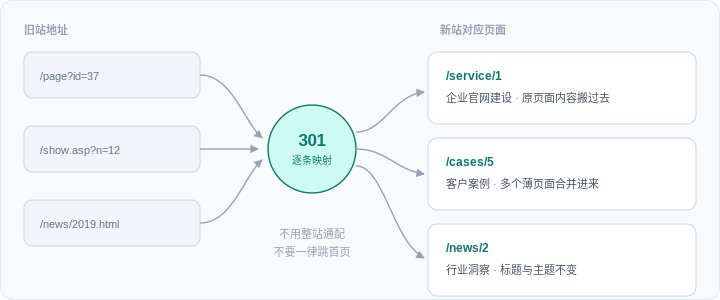
The most common mistake in a redesign is treating "redraw everything" as "reorganize." A visual refresh solves whether the site looks good; a redesign solves where the content goes, what happens to old URLs, and how to keep existing indexing and backlinks. Fail at these three and the day the new site launches is the day traffic starts falling.
Our sequence is: inventory the content and URLs first, then define the hierarchy and URL rules, and only then build pages.
The redirect map is produced before development begins and handed to you for sign-off—it's the one thing in a migration that can't be added afterward.
First, decide: redesign, or just optimize?
Not every old site is worth rebuilding. The deciding factor is whether the problem lies in structure or content:
- Fixable on the current site: the section hierarchy is sound, but titles and descriptions are sloppy, internal links are unsystematic, structured data is missing, and mobile layout is rough. All of this can be fixed within the existing structure, without touching URLs—the lowest-risk option.
- A redesign pays off: every page sits flat on one level, URLs reveal no ownership (
/page?id=37and the like), the template locks the heading hierarchy so the site has one giant H1, mobile overflows horizontally to the point of being unreadable, or you want multilingual URLs the system can't support. - Rebuild rather than redesign: the domain has a history of problems, the codebase has no maintainer, or the CMS can't even add a product. Redesigning here is renovating on top of a broken foundation.
You'll get this assessment at the first conversation, including what a redesign can and can't achieve. If optimization is enough, we'll say so.
Which pages must be preserved
In a migration, not all pages carry equal weight. Prioritize these three types; the rest can be merged or retired:
- Pages with backlinks A URL linked from industry sites, directories, or client websites—if it 404s, the link's authority is gone.
- Pages ranking on a single keyword These are the most sensitive; don't casually change the direction of their titles or body topic during migration.
- Pages that actually generate inquiries Your CMS or analytics will show which pages hold attention and submit forms. Move their content over unchanged.
Conversely, thin pages (say, a product page with a single image) are better merged into a related page during migration than preserved as-is—thin pages won't hold up on the new site either.
How to do redirects properly
- Export every URL on the old site and map it one-to-one to a new page, producing a redirect map. It must be checkable row by row—not a blanket "old pages will redirect to the new site."
- Where no equivalent exists, redirect to the closest relevant page (an old product page to the new category page)—never send everything to the homepage. Redirecting the whole site to the homepage tells search engines all those pages are gone.
- Use 301, not 302. A 302 is temporary and doesn't pass authority.
- Don't stack redirect chains: A → B → C should be A → C directly.
- Spot-check after launch: open each old URL, confirm the new page it lands on actually corresponds, and that the status code is 200.
Workflow and acceptance criteria
The table below sets out our approach by object, interaction, and acceptance. Acceptance lists only what is actually delivered and can be verified—no ranking, citation-position, or traffic promises.
| Stage | Object | Interaction & approach | Acceptance |
|---|---|---|---|
| Content inventory | Old pages, content assets, URLs | Inventory and classify page by page; decide what to keep, merge, or retire. | A list of old pages with disposition recommendations is delivered. |
| Hierarchy & URLs | Section structure, URL conventions | Re-layer by content topic; give URLs a predictable pattern. | An old-to-new URL mapping table is delivered. |
| Redirect rules | Old URLs and 301s | Point each old URL to its matching new page—no site-wide wildcard. | Redirect chains are spot-checked; the final page is 200 and content matches. |
| Index continuity | Sitemap, internal links, indexing status | Update sitemap and internal links in step; submit the new version. | Crawl and index status are checkable; no dead links. |
| Launch checks | Pages, forms, and mobile | Verify content and functionality item by item after migration. | A check list and issue-closure record are delivered. |
Only once content has been moved over do we move on to optimizing titles, descriptions, and structured data.
Three practices that hurt traffic most
- Redirecting the entire site to the homepage It looks as though every old URL still opens, but the value of each link is flattened into one.
- Running old and new pages simultaneously Without redirects, the two versions compete and search engines can't pick a canonical one.
- Changing the topic while migrating When both the URL and the content change, search engines can't tell it's the same page and must re-evaluate it as new.
Two to four weeks after launch
Some fluctuation after a migration is normal and usually settles within two to four weeks. What you do during this period is record, not change things frequently:
- Log indexed page count, crawl errors, and 404 reports weekly; add redirects for any new 404s.
- Verify forms still receive inquiries—this is the most overlooked and most fatal check.
- See whether traffic to key pages returns to pre-migration levels; investigate any that don't (title, internal links, redirect correctness).
Don't rush to rewrite titles or overhaul content during the fluctuation window, or you won't be able to tell whether an effect came from the migration or from your changes.
How this relates to the other three services
A redesign is usually one-off structural realignment; afterward you return to the routine of a "corporate site" or "export site," then ongoing SEO & GEO maintenance. If your site's structure still works and only the content is dated, optimizing first is far more economical than redesigning.
Tell us about your project
No complete brief is needed. Tell us your target audience, the inquiries you expect, and your current challenges, and we'll give you a structural assessment.
Want to start with FAQ, or learn aboutProject Workflow。